40 Questions
Specs & Preview Download PDF 50 Questions Compact OMR Sheet PDF (6-Digit Roll Only, Large Bubbles)
A4 Size (Pure B&W Print) 210 × 297 mm (A4)
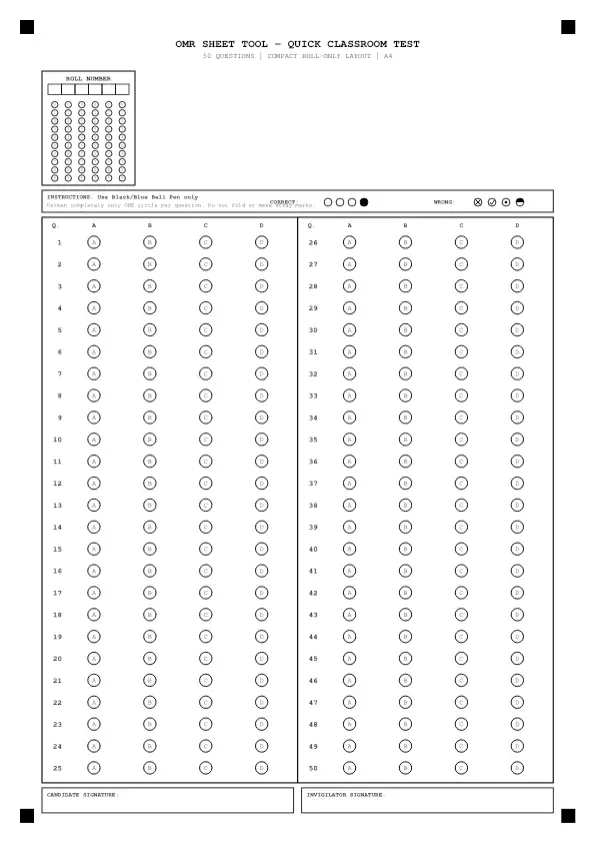
A4 PDF • 50 Questions 4 Options (A–D)
Ideal for fast classroom tests where students only bubble a 6-digit roll number, maximizing vertical space for larger bubbles.
Always print at "100% Scale" or "Actual Size". Never select "Fit to Printable Area".
OMR Sheet Technical Specifications
- Paper Size
- A4 (210 × 297 mm / 595 × 842 pt)
- Total Questions
- 50 Questions
- Options per Question
- 4 (A–D)
- Number of Columns
- 2 Columns
- Roll Number Digits
- 6 Digits (0–9)
- Question Paper Set Code
- None
- Candidate Name & Info Block
- None
- Color Profile
- Pure Black & White (Scanner & Camera Ready)
OMR Bubbling Time Reserve & Column Checkpoints
~4 min bubbling reserveDarkening one bubble takes ~4.5 seconds on average. Follow these checkpoints to avoid last-minute row-shift panic:
| Columns | Questions | Target Checkpoint (60m Exam) |
|---|---|---|
| Column 1 | Q1 – Q25 | 30 min elapsed |
| Column 2 | Q26 – Q50 | 60 min elapsed |
Critical Printing Instructions
- Always print at "100% Scale" or "Actual Size". Never select "Fit to Printable Area".
- Use clean white A4 paper (70–80 GSM minimum; 90–100 GSM recommended for heavy pen use).
- Ensure all 4 solid black corner alignment marks are completely visible and not clipped by margins.
50-question practice plan
Suggested classroom activity
Use five ten-question sections for a mixed-topic classroom test. Keep the answer key grouped the same way so feedback can show strengths by topic.
Layout choice
The compact version uses a six-digit roll-number grid rather than the standard eight-digit grid. Choose it when six digits cover your class identifiers. Check the preview and make sure students know which number to enter before you print a full set.
Timing choices for this size
These are example practice budgets, not official exam durations. Choose a pace that fits the difficulty of your questions. The table includes solving and marking time together; it does not add extra time for a final review.
| Seconds per question | Time for this sheet |
|---|---|
| 30 | 25 minutes |
| 60 | 50 minutes |
| 90 | 75 minutes |
Exam mapping and limits
No exact current official exam match has been verified for this size and option count. Use it for a teacher-set test or a selected part of a larger paper. Check the official question count, options, scoring rules and format before choosing a sheet.
Check the layout before a full class test
Number the question paper and answer key from 1 through the last row shown here. If you use fewer questions, tell students which rows to leave blank. If your paper has sections that restart numbering, prepare a clear mapping to the continuous row numbers on this sheet. Make one test print and check every column, not just the first row.
After a short trial, record the time spent solving and marking separately. Review mistakes by section rather than comparing only total scores. Keep the key with the same version of the question paper, and inspect ambiguous marks before exporting class results. Use the next smaller size when the spare rows cause confusion; use a larger sheet when the test genuinely needs more questions.
Frequently Asked Questions (FAQ)
Can this 50-question OMR sheet be graded by a scanner or camera grader?
Every sheet includes 4 solid black corner alignment marks (fiducials) designed for our in-browser Beta Camera Grader and local classroom evaluation. However, to be completely transparent: camera grading is a beta utility whose accuracy depends heavily on even lighting, 100% print scale, and a flat page.
We make no 100% accuracy guarantees, and these sheets are not programmed for proprietary commercial hardware OMR machines. For deterministic scoring, use our OMR Score Calculator or a punched master overlay.
How many minutes should I reserve for bubbling 50 questions?
Use 4 minutes as a starting estimate for 50 answers. The tool assumes 4.5 seconds per bubble for planning; this is not a measured average or an exam rule. Time yourself on paper, then adjust the reserve and leave time to check each question number.
Is this an official exam board OMR sheet?
No. This is an original generic practice layout built for mock tests, coaching series, and home practice. It is not affiliated with any official examination authority. Match the question count and answer options to your practice paper. Check the preview before you download or print the sheet.
Related OMR Sheets
Related practice formats
These links lead to practice formats. Check the official source and verification notes on each exam page before choosing a layout.
Helpful OMR Guides
What Is an OMR Sheet? Complete Guide to Optical Mark Recognition
An OMR sheet is a paper answer form with rows of bubbles. OMR means Optical Mark Recognition. Each row stands for one question, and each bubble stands for an answer choice. You shade your choice, then compare the marked sheet with a key by hand or with a suitable grading tool.
How to Fill an OMR Sheet Correctly & Faster in Exams
Write your details first, then shade one answer bubble in each row. Check the question number before you mark the sheet. Fill the circle neatly and keep ink within its edge. Follow the pen rules on your test paper, and practise with a short set before a full timed test.
Pencil vs Pen for OMR Sheets: Why Black Ballpoint Pen Wins
Use the pen or pencil stated in your test instructions. There is no single rule that applies to every OMR test. For home practice, try your chosen pen on a spare sheet. Check that it makes a clear mark without smears, leaks, or damage to the paper.
10 Common OMR Sheet Mistakes to Avoid in Competitive Exams
Check the row number, mark just one choice when the test calls for one, and keep the sheet clean. A correct answer in the wrong row can spoil your score. Practise checking the question number each time you move from the paper to the sheet, especially after a skipped question.
50 Questions • A4 PDF
4 Options (A–D)